Coming to Mac App Store

Keep Your Mac
Awake.

A native macOS menu bar app that prevents your Mac from sleeping — perfectly suited for presentations, cooking, reading, code demos, or any moment when sleep would be inconvenient.
100%
Native macOS
4+
Prevention Modes
$0
To Get Started
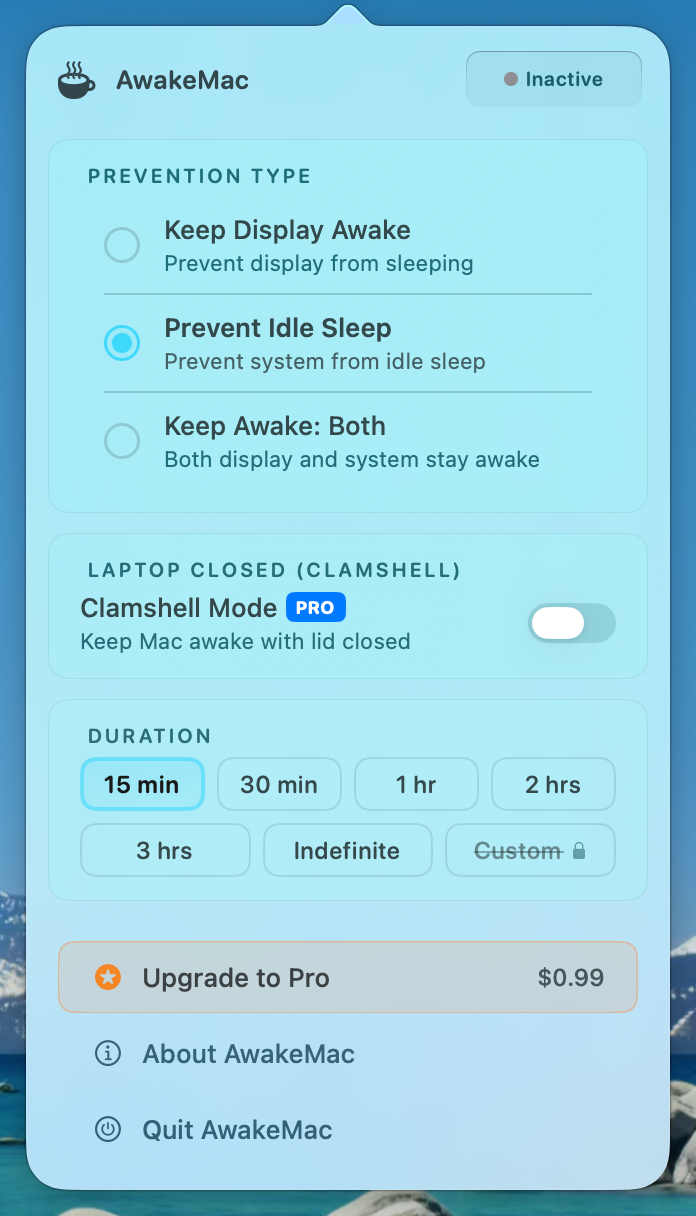
AwakeMac popover — real screenshot of the menu bar app

Designed for the moments that matter

macOS defaults get in the way more often than you'd think. AwakeMac puts you back in control — with one click, your Mac stays exactly as you left it.

Zero Friction

Lives in your menu bar, hidden from the Dock. One click to activate, one click to stop. No windows, no clutter.

Works With Your Workflow

Perfect for cooking along with recipes, giving presentations, demoing code, reading, or any long-running task where you need your screen on.

Native & Secure

Built with Swift and AppKit. No background agents, no data collection, no internet required. Your Mac, your privacy.

Everything you need to stay awake

Simple on the surface, powerful under the hood. AwakeMac handles every prevent-sleep scenario with elegance.

Display Awake

Keep your external monitor on even when your MacBook lid is closed. Ideal for desk setups with clamshell mode.

Idle Prevention

Stop macOS from entering idle sleep during long-running tasks like rendering, downloading, or automated scripts.

Pro

Clamshell Mode

Go lid-closed with an external display. Your MacBook becomes a silent, invisible powerhouse humming away in your bag.

Quick Presets

Choose from 15 min, 30 min, 1 hr, 2 hr, or 3 hr — or go indefinite. Pro unlocks unlimited custom durations.

Sound Alerts

Play a sound when AwakeMac starts and another when it stops. Know exactly when your session begins and ends.

Menu Bar Only

No Dock icon, no distracting windows. AwakeMac lives quietly in your menu bar — there when you need it, invisible when you don't.

Three steps to a sleepless Mac

No system preferences tweaking, no terminal commands, no complicated setup. Just click and go.

Click the Icon

Find the AwakeMac coffee cup in your menu bar and click it. A sleek popover appears instantly.

Choose Your Mode

Pick how you want to prevent sleep — display only, idle only, or both. Select a duration or go indefinite.

Stay Awake

Hit Start. Watch the countdown, hear the sound alerts, and focus on what matters. One more click to stop.

Start free, upgrade when you're ready

The core functionality is always free. Upgrade to Pro for unlimited sessions, clamshell mode, and custom durations.

Free
$0
For most use cases
All prevention types (Display / Idle / Both)
Preset durations (15m, 30m, 1h, 2h, 3h)
Indefinite mode
Sound alerts
Launch at Login
4-hour max duration
Custom duration
Clamshell mode
Screen overlay message
Download Free
Pro
$0.99
One-time purchase, yours forever
Everything in Free
Unlimited duration — no time cap
Custom duration — set any time
Clamshell mode — lid closed, no sleep
Screen overlay message
Lifetime access, no subscription
Unlock Pro — $0.99

Common questions

Clamshell mode requires two conditions: your MacBook must be connected to external power (not running on battery) and connected to an external display. When both are connected, closing the lid keeps your Mac fully awake and your external monitor on. AwakeMac Pro handles all the technical details for you.
AwakeMac prevents your Mac from entering sleep — it does not prevent the display from dimming or turn off based on power settings. When running on battery, macOS will still manage power appropriately. For extended sessions, we recommend keeping your Mac plugged in. Clamshell mode specifically requires external power by design.
Keep Display Awake prevents your monitor from sleeping — useful when you want the screen on but don't mind if the Mac processes sleep. Prevent Idle Sleep keeps the Mac awake even when idle (no mouse/keyboard activity) but allows display to sleep. Both combines them for maximum prevention. "Both" is the default and covers most use cases.
No. AwakeMac is free to use with generous limits, and Pro is a one-time purchase of $0.99. Pay once, unlock forever. There are no subscriptions, no recurring charges, and no in-app ads. Your purchase is linked to your Mac App Store account.
No. AwakeMac is a purely local utility. It does not connect to the internet, does not send analytics, and does not collect personal information. Your settings are stored locally on your Mac. See our Privacy Policy for full details.
AwakeMac is currently in active development. Sign up below to be notified the moment it goes live on the Mac App Store. We expect to launch within the coming months.
Coming Soon to Mac App Store

Be the first to know when we launch

Drop your email and we'll notify you the moment AwakeMac hits the Mac App Store. No spam, just one email when we're live.

Mac App Store